- Written by: Hummaid Naseer
- August 11, 2025
- Categories: Custom Software & App Development
When you’re working solo, version control with Git can feel simple, even forgiving. You commit when you remember, push when it’s convenient, and maybe even fix mistakes with a quick –force push. But as soon as you add more people to the mix, those habits start to break down fast.
In a team environment, version control becomes more than a backup system; it’s a shared source of truth. Without structure, collaboration turns into chaos: developers overwrite each other’s work, get stuck in endless merge conflicts, or ship broken code from poorly managed branches. As teams scale, so does the need for clear branching models, naming conventions, review processes, and commit hygiene.
A smart version control strategy doesn’t just prevent problems, it keeps development flowing smoothly, makes onboarding easier, and ensures your team can scale without technical drama.
The Role of Version Control in Team Productivity
Version control isn’t just about tracking code. It’s the backbone of modern software collaboration. It allows teams to work in parallel without stepping on each other’s toes. By coordinating contributions across branches, it ensures that multiple developers can safely build, fix, and improve features simultaneously.
Every change is logged with full context, who made it, what changed, and why. This historical clarity makes debugging, onboarding, and code reviews far more efficient. Branching also enables safe experimentation, allowing teams to test new ideas without disrupting the main product.
In CI/CD pipelines, version control is critical. It enables automated testing, deployments, and rollbacks, ensuring stability while maintaining speed. Ultimately, good version control practices lead to fewer errors, faster delivery, and a development team that can scale confidently.
Git 101: Repos, Branches, Commits, and Pull Requests
Before diving into advanced workflows, it’s crucial that every team member. Especially new developers who understand the fundamentals of Git. Here’s a quick refresher on the core building blocks of version control:
Repository (Repo)
A repo is your project’s home in Git. It tracks every file, folder, and change over time. You can have:
Local repos (on your machine)
Remote repos (hosted on platforms like GitHub, GitLab, Bitbucket)
Branches
Branches let you work on different versions of your codebase simultaneously. For example:
main or master = the stable production-ready branch
feature/login-ui = a branch for the new login UI
Branches isolate changes until they’re ready to merge, reducing risk and enabling parallel development.
Commits
A commit is a snapshot of changes made to your files. Each commit has:
A unique ID (hash)
A message describing what changed
An author and timestamp
Commits tell the story of your project and help you revert or audit changes when needed.
Pull Requests (PRs)
A pull request (or merge request) is how you propose changes from one branch into another (e.g., feature/cart → main). PRs allow for:
Code reviews
Automated tests
Discussion and feedback
They’re essential for maintaining code quality and team alignment.
Popular Branching Strategies (And When to Use Them)
Branching strategies define how your team collaborates in Git, whether you’re building features, fixing bugs, or preparing releases. Choosing the right strategy depends on your team size, release frequency, and deployment style.
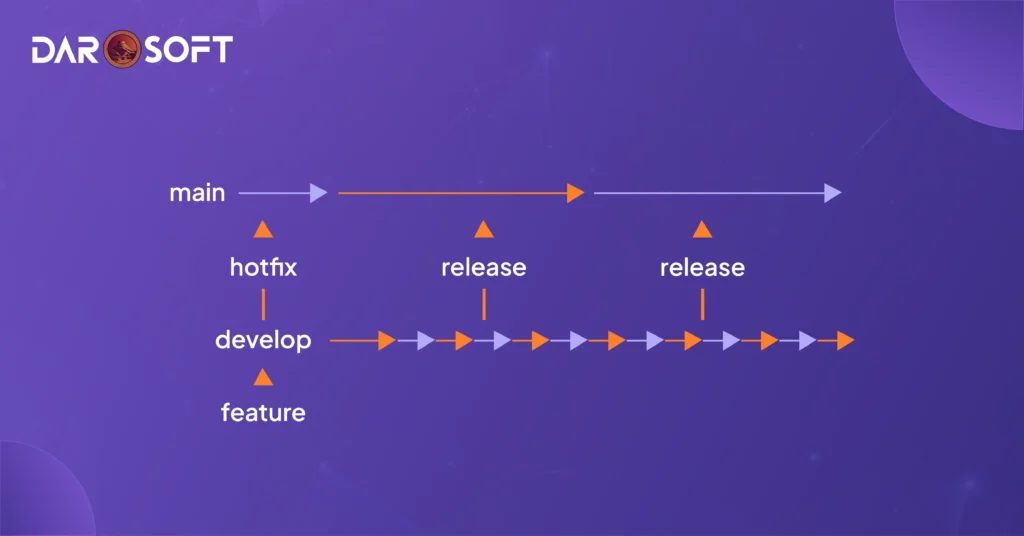
1. Git Flow: Best for Release-Driven Teams
A structured strategy that separates features, releases, and hotfixes. Great for larger teams with planned versioning and QA phases.
Branches Used:
main – Stable production code
develop – Ongoing development
feature/* – For new features
release/* – For staging a version
hotfix/* – For critical production fixes
When to use:
Complex projects with scheduled releases, formal QA, and multiple environments.
Diagram:
2. GitHub Flow: Lightweight, Ideal for Continuous Delivery
A simpler model used by many modern teams that deploy frequently and favor agility.
Branches Used:
main – Always deployable
feature/* – Branches created from main, merged via pull requests
When to use:
Agile teams practice continuous deployment or delivery.
Workflow:
Css
main ─> feature/login ─> Pull Request ─> Code Review ─> Merge to main
3. Trunk-Based Development: For High-Frequency Deployments
Teams commit directly (or quickly) to a shared trunk/main, using short-lived feature branches or toggles. Relies heavily on CI/CD and testing.
Key Concepts:
No long-lived branches
Feature flags are used to hide incomplete work
CI/CD must be robust
When to use:
DevOps-savvy teams, startups, or large organisations are pushing multiple times a day.
Diagram:
css
main ──>───>───>───>───>
feature feature feature
(hours, not days)
4. Release Branching: For Versioned Products and Hotfixes
A strategy focused on supporting multiple versions post-release.
Branches Used:
main – Ongoing dev
release/x.x – Live versions
hotfix/x.x – Bug fixes for older versions
support/* – LTS or enterprise support branches
When to use:
SaaS platforms, mobile apps, or APIs supporting multiple releases or customer versions.
Diagram:
arduino
main ───>────>────>────────>
│ │ │
release/1.0 release/1.1 release/2.0
│ │
hotfix/1.0.1 hotfix/2.0.1
Each strategy has trade-offs. GitHub Flow encourages speed, Git Flow encourages structure, and Trunk-Based favors automation and discipline. The key is choosing one that matches your team size, deployment culture, and product lifecycle.

Best Practices for Commit Hygiene
Use Meaningful Commit Messages
Write commit messages that explain what you did, not just that you “fixed stuff.” Follow conventions like:
feat: for new features → feat: add user authentication flow
fix: for bug fixes → fix: handle null errors in cart service
chore: for routine tasks → chore: update dependencies
docs: for documentation → docs: add API usage examples
Good messages make your repo self-documenting and easier to debug.
Keep Commits Small and Atomic
Make each commit do one thing only. This helps with:
Easier code reviews
Simpler rollbacks
Clearer blame/annotation
Tip: A commit should be small enough to explain in a single sentence.
Avoid Committing Generated/Compiled Files
Don’t clutter your repo with files that can be regenerated:
.class, .pyc, dist/, build/, etc.
Use .gitignore to prevent accidental inclusion.
Keeps your repo clean and minimizes merge conflicts.
Squash Unnecessary Commits Before Merging
Before merging feature branches:
Squash “WIP”, “oops”, or “fix typo” commits
Use interactive rebase (git rebase -i) to clean up history
Keep only commits that reflect meaningful progress
A clean history tells the story of your code, not your typos.
Pull Requests That Don’t Waste Everyone’s Time
Use Clear Titles and Descriptions
Make the purpose of the PR obvious at a glance. A good title might look like:
feat: add email verification flow for new users
Fix: resolve 500 error on checkout API
In the description, include:
What this PR does
Why it needed
Any relevant context, screenshots, or tickets (e.g., Closes #123)
Clarity helps reviewers jump in without asking “what is this for?”
Tag Relevant Reviewers
Don’t just hope someone notices. Mention:
Engineers responsible for affected modules
QA or designers if UI/UX is involved
Team leads for high-impact changes
Use GitHub code owners or @ mentions to assign accountability directly.
Use Checklists and CI Checks
Make it easy to verify readiness:
Example checklist in PR:
Code compiles
Tests pass
No hard-coded values
Feature toggled or backwards-compatible
Let CI/CD pipelines catch the basics. so reviewers can focus on logic and design.
Keep PRs Small, Focused, and Testable
Small PRs are easier to:
Review thoroughly
Test quickly
Merge safely
Rule of thumb: one PR = one unit of change (e.g., one feature, one fix, or one refactor).

Code Review Guidelines for Scaling Teams
Define Ownership and Responsibility
Establish who owns what:
Every module or repo should have a designated owner (use CODEOWNERS files).
PR authors are responsible for providing context, not just code.
Reviewers are responsible for both quality and clarity, not just rubber-stamping.
Make it clear: code review is a shared accountability, not a gatekeeping task.
Automate Linting and Formatting
Free up reviewers to focus on logic and architecture, not tabs vs. spaces:
Use ESLint, Prettier, Black, or other formatters depending on your stack.
Add pre-commit hooks and CI checks (e.g., with Husky or GitHub Actions).
Block merges if style/lint fails to enforce consistency.
Let bots handle style. People should review the substance.
Foster a Constructive Feedback Culture
Encourage feedback that’s:
Specific: Point to exact lines or behaviours.
Objective: Focus on code, not coder.
Actionable: Offer a path forward (e.g., “Consider extracting this into a helper function for reuse”).
Do this:
“This logic feels tightly coupled. Could we abstract it for re usability?”
Not this:
“This is wrong.”
Praise matters too. Reinforce what’s working, not just what’s broken.
Encourage Async Reviews Across Time Zones
Global teams can’t wait for meetings:
Keep PRs small so they’re re viewable in short bursts.
Provide clear PR descriptions, with expected behaviour, context, and screenshots/logs where needed.
Use Slack, GitHub, or Notion for async review rotation tracking.
Consider “review buddies” in opposite time zones to reduce delays.
Async doesn’t mean slow—it means intentional.
Tagging, Releasing, and Rollbacks
Use Semantic Versioning (SemVer)
Stick to a clear and consistent versioning format:
MAJOR.MINOR.PATCH (e.g., v2.5.1)
MAJOR – Breaking changes
MINOR – New features, backward-compatible
PATCH – Bug fixes, small improvements
Example: v1.3.0 = new feature release; v2.0.0 = breaking changes introduced.
Automate Change logs and Release Notes
Don’t rely on memory or manual typing:
Use tools like Conventional Commits, Release Drafter, or semantic-release to auto-generate changelogs.
Include:
New features
Bug fixes
Breaking changes
Contributors (optional but great for team morale)
Clear change logs = faster on boarding, easier debugging, and better transparency.
Keep Releases Documented and Testable
Every release should be:
Linked to a specific tag or commit
Easily traceable in version control (use annotated Git tags)
Backed by automated test results and CI pipelines
Stored in a release registry (if you’re publishing binaries, packages, etc.)
Pro tip: Include links to change logs and documentation in the release description.
Rollback with Confidence
Things will break. Be ready.
Use Git tags or release branches to quickly revert to a known stable state.
Maintain rollback playbooks for key services.
In CI/CD: Use tools like feature flags or blue-green deployments for safer rollbacks.
Releasing isn’t done until you’ve made rollback painless.
Tools That Support Team-Based Git Workflows
GitHub / GitLab / Bitbucket – Collaboration Platforms
These are more than just Git hosting services—they’re full-stack collaboration platforms.
Pull Requests / Merge Requests
Enable code reviews, inline comments, and approvals.Branch Protection Rules
Prevent direct pushes to main, enforce PR reviews and CI checks.Issue Tracking & Project Boards
Link commits and PRs to issues, track progress in Kanban/Scrum style.Wikis & Documentation
Keep shared knowledge in sync with code.
These platforms centralise code, conversation, and collaboration—especially vital for distributed teams.
Git Hooks – Automate Checks at the Source
Git hooks run scripts at key points in the Git lifecycle (e.g., before commit, after merge).
Pre-commit: Run linters (ESLint, Prettier), test suites, or formatters.
Commit-msg: Enforce commit message standards (e.g., Conventional Commits).
Pre-push: Run full test suites before allowing a push.
Use frameworks like Husky to manage hooks across teams with ease.
CI/CD Integration – Ship Faster, Safer
Tie your version control directly into your deployment process.
GitHub Actions: Native to GitHub, great for linting, testing, building, and deploying.
GitLab CI/CD: Deeply integrated with GitLab, with full pipeline as code.
CircleCI / Jenkins / Travis CI: Flexible third-party tools for complex workflows.
Every commit or PR can trigger builds, tests, and deployments—bringing automation into your workflow.
GitLens / SourceTree – Better Visibility for Teams
GitLens (VS Code Extension): Shows authorship, blame, and commit history inline. Great for understanding context while coding.
SourceTree (Atlassian): Visual Git GUI for staging, branching, merging—ideal for those who prefer less terminal.
These tools help teams visualise Git activity, improving on boarding, reviews, and collaboration.
Conclusion
Version control isn’t just about Git commands or branching strategies. It’s about fostering team trust, consistency, and shared responsibility. As teams grow, so do the risks of miscommunication, overwritten code, or broken releases. A mature version control culture ensures that everyone from juniors to leads works transparently, tracks changes thoughtfully, and builds software with confidence.
When used right, version control becomes more than a tool. It becomes a source of truth, a collaboration backbone, and a quality gate. It supports experimentation without chaos, autonomy without silos, and speed without shortcuts. Invest in it early, evolve it continuously, and make it part of your engineering DNA.