- Written by: Hummaid Naseer
- August 27, 2025
- Categories: Services & Products
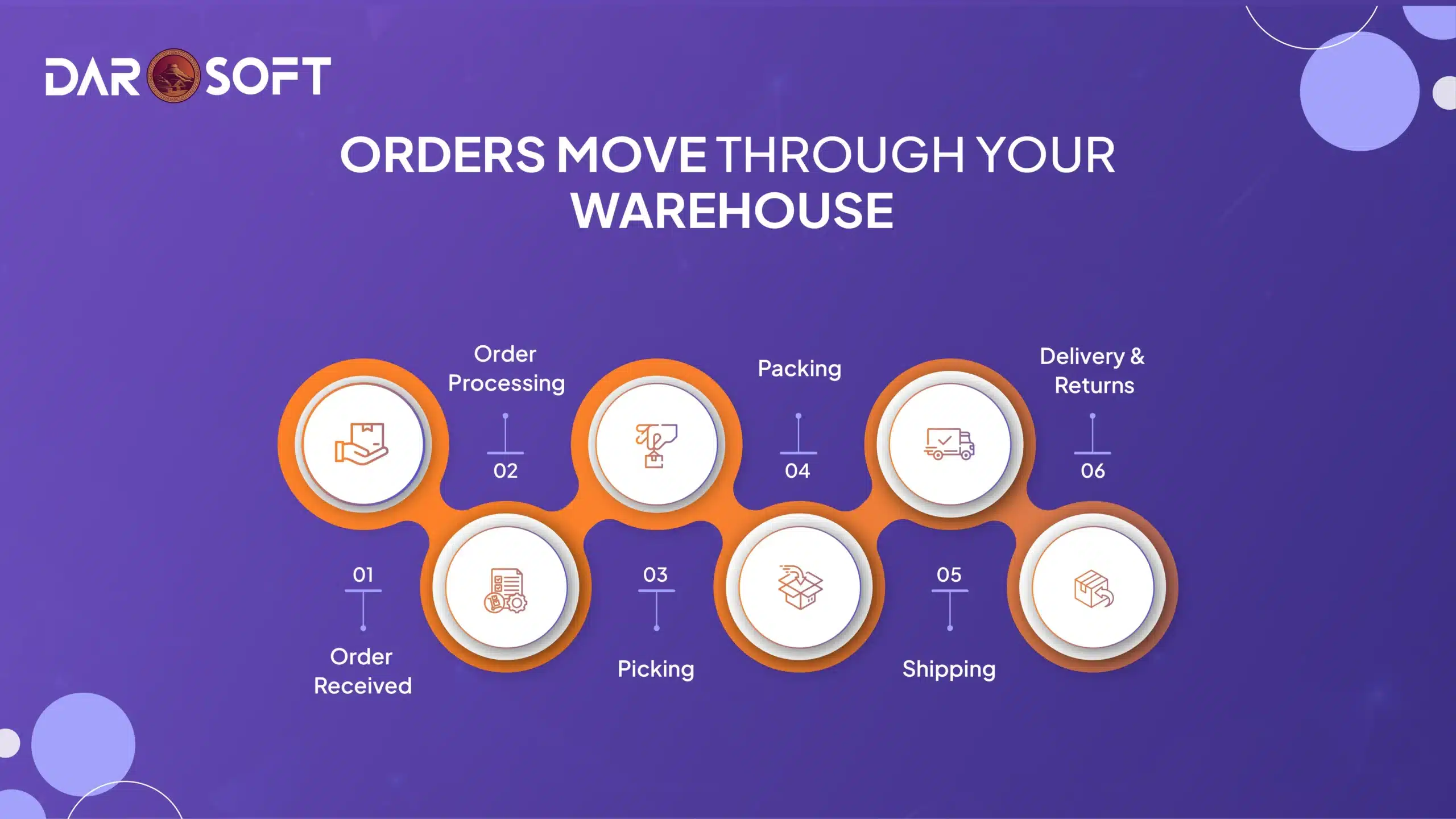
How Orders Move Through Your Warehouse
Behind every “Order Confirmed” email is a well-oiled process that keeps your business moving and your customers happy. Whether you’re selling through Shopify, Amazon, or your site, fulfillment is where promises meet reality. But fulfillment isn’t just about shipping; it’s a chain of critical steps that begins the moment an order is placed.
In this guide, we’ll break down the six key stages of order fulfillment, what they are, how they work, and where things often go wrong. If you’re scaling up or just trying to streamline, understanding this workflow is your first step toward faster deliveries, fewer errors, and happier customers.
Let’s walk through the journey, click by click, pick by pick.
Order Received
The first step in the fulfillment process kicks off the moment a customer completes a purchase, whether it’s through your online store, a marketplace like Amazon or Etsy, a B2B portal, or a physical point-of-sale (POS) system. At this point, the order must be instantly captured by your Order Management System (OMS) to trigger the entire fulfillment workflow.
What Happens in This Step
Order Ingestion Across Channels:
Your OMS acts as a central hub, aggregating order data from all your sales channels. This includes product SKUs, quantities, customer details, shipping preferences, and payment confirmation. If your channels aren’t integrated properly, orders may get delayed, duplicated, or missed altogether.Customer Confirmation:
As soon as the order is captured, the system sends a confirmation email or message to the customer, reinforcing trust and providing a digital receipt. This message often includes an order number, estimated delivery date, and next steps.Order Validation:
Before the warehouse even touches the item, the system checks the order for red flags invalid shipping addresses, payment failures, duplicate submissions, or out-of-stock items. This validation phase helps prevent costly mistakes later on.Task Assignment:
Once validated, the system assigns the order to the appropriate warehouse or fulfillment center, based on rules like location, inventory availability, shipping method, and capacity.
Why It Matters
If you don’t have real-time visibility or a unified system, even a single order can fall through the cracks. Delays in this phase often snowball, leading to fulfillment bottlenecks, angry customers, and extra manual work.
Signs Your “Order Received” Process is Optimised
You can view new orders from all platforms in a single dashboard.
You receive instant alerts for out-of-stock items or failed payments.
Customer confirmation emails are sent automatically and accurately.
Orders are routed automatically to the most logical warehouse.
Order Processing
Once the order is successfully received and confirmed, it moves into the processing phase, where backend systems kick in to ensure everything is ready for fulfillment.
What Happens in This Step
Payment Verification:
The system checks whether the payment has been authorised and completed. Depending on your platform, this might involve gateways like Stripe, PayPal, or direct bank transfers. Orders flagged for failed or suspicious transactions are paused here for manual review or automatic rejection.Fraud Detection & Risk Scoring (Optional but Recommended):
Advanced systems use machine learning or rule-based logic to flag high-risk orders like mismatched billing and shipping addresses, unusually high quantities, or suspicious IP locations. Catching potential fraud early protects your bottom line.Inventory Check:
The system ensures that the ordered items are in stock and reserved for this specific order. This prevents overselling and double-booking, especially in high-volume or multichannel environments.Stock Allocation & Hold:
Once confirmed, the system deducts or holds the items in your inventory system even before picking begins. This ensures no one else can “claim” that stock during the processing lag.Picking List Generation:
Based on the product SKUs and warehouse layout, a picking list is generated and sent to the appropriate zone in the warehouse. This list may be optimised for batch picking or wave picking, depending on your system’s capabilities.
Automation Tips
Auto-Fraud Filters: Set rules for flagging risky orders like total value thresholds, delivery to high-risk zones, or mismatched info.
Real-Time Inventory Sync: Use tools like Logisticify to automatically sync stock across all channels, reducing the risk of overselling.
Order Tagging: Automatically tag orders (e.g., “Express Shipping,” “Fragile,” “High Priority”) for proper handling downstream.
Why It Matters
Any bottleneck here delays the entire fulfillment chain. A slow or error-prone processing system causes fulfillment lags, stockouts, or costly refunds, especially during peak seasons or flash sales.
Signs Your “Order Processing” Step is Healthy
Payments are verified in seconds, not minutes.
Inventory allocation happens in real time.
Suspicious orders are flagged without manual review.
The picking list is generated instantly and accurately.
Picking
Once an order is processed and confirmed, it moves to the picking stage, where the items are physically retrieved from the warehouse shelves.
What Happens in This Step
Picklist Generation:
The system creates a digital or printed picklist that includes item SKUs, quantities, and storage locations (e.g., Aisle 3, Bin B7). Smart systems sort picklists by warehouse zones or optimal walking paths to reduce picker travel time.Item Retrieval:
Warehouse staff or autonomous mobile robots (AMRs) in advanced setups use the picklist to locate and collect the required items. This step is crucial, as errors here lead directly to incorrect orders or delayed shipments.Barcode/QR Code Scanning:
Scanning each item as it’s picked ensures it matches the order. This reduces human error and provides a digital trail of what was picked, when, and by whom.Batch or Wave Picking (for High Volume):
In busy operations, systems may consolidate multiple orders into one picking round. For example:Batch Picking: One picker collects items for multiple orders in a single trip.
Wave Picking: Groups of similar orders are picked during scheduled time slots.
Real-Time Inventory Update:
Once picked, stock levels are automatically updated in your inventory system, preventing overselling and helping with demand forecasting.
Efficiency Tips
Smart Bin Locations: Store fast-moving items in easy-to-reach areas, or use dynamic slotting where locations adapt to order trends.
Pick-to-Light Systems: Visual indicators light up to guide pickers to the correct bin, reducing search time.
Voice Picking or Wearables: Hands-free tech allows pickers to hear instructions and confirm picks without looking at screens.
Why It Matters
Picking is labor-intensive and time-sensitive. A mistake here means the wrong item gets packed and shipped, leading to returns, refunds, and unhappy customers. It’s also one of the largest cost centers in warehouse operations.
Signs of an Efficient Picking Process
Minimal walking time per order
Zero mis-picks thanks to scanning or automated validation
Real-time inventory sync after each pick
High throughput even during sales surges
Packing
After items are picked, they move to the packing station, where accuracy, protection, and efficiency take center stage.
What Happens in This Step
Quality Check:
Before packing begins, items are visually inspected to confirm they’re correct, undamaged, and meet quality standards. This step acts as a final verification before the package leaves your warehouse.Packing Station Workflow:
At the packing station, staff (or automated systems) match items to orders, scan barcodes, and pack them in the most suitable packaging material, be it a box, mailer, or pallet.Secure Packaging:
Items are wrapped, cushioned, or secured depending on their fragility. This prevents breakage during transit, especially for electronics, glassware, or bundled items.Labeling:
Shipping labels are automatically printed and attached to each package. Labels include tracking numbers, shipping addresses, barcodes, and sometimes customs declarations for international orders.Documentation (if needed):
Packing slips, invoices, return instructions, or branded inserts can be added before sealing.
Packing Optimization Tips
Dimension-Based Box Selection:
Use software or smart scales to recommend the smallest box that safely fits all items, saving on material costs and dimensional shipping charges.Group Similar Orders:
If multiple customers ordered the same combination of items, batch packing them in one session can reduce repacking time and packaging waste.Eco-Friendly Packaging:
Reduce packaging waste by using recyclable materials or paper void-fill instead of plastic. Sustainability is a competitive edge for modern eCommerce.Branded Experience:
Add a personalized touch like a thank-you card or branded tissue paper to elevate the unboxing experience and boost customer loyalty.
Why It Matters
Improper packing leads to damaged goods, higher return rates, and lost trust. On the flip side, efficient packing reduces shipping costs, speeds up fulfillment, and improves customer satisfaction.
Signs of an Efficient Packing Process
Low damage or return rates
Minimal packaging waste
Fast packing times with high order accuracy
Smart box selection that reduces dimensional weight fees
Shipping
With the order packed and labeled, it’s now ready to leave the warehouse and make its way to the customer’s doorstep.
What Happens in This Step
Carrier Pickup:
The package is handed off to your designated shipping carrier, whether that’s UPS, FedEx, DHL, USPS, or a regional/local courier. Some warehouses schedule daily pickups, while others drop shipments off at carrier hubs.Label Scanning & Handover Confirmation:
As the carrier scans the shipping label, the order status updates in your system. This triggers an automatic shipping confirmation email or SMS to the customer, often including a tracking number and estimated delivery date.In-Transit Tracking:
Customers (and your support team) can follow the shipment’s journey via the tracking link. This transparency helps reduce WISMO (“Where is my order?”) inquiries and builds trust.Shipping Method & Speed:
Based on customer selection or your internal rules, the shipping method might range from standard economy to same-day delivery, especially in urban areas or for premium services.
Shipping Optimization Tips
Multi-Carrier Integration:
Don’t rely on a single carrier. Use a shipping aggregator or logistics software (like ShipStation, Shippo, or Logisticify) to compare rates, automate selection based on zone, speed, or reliability, and reduce costs.Zone-Based Shipping Rules:
Customize shipping strategies by location. Use faster, cheaper couriers for nearby deliveries and optimize for cost-efficiency on long-haul orders.Batch Shipping:
Automate label generation and sort orders by courier to streamline the end-of-day handoff. This saves time and reduces the chance of misrouted parcels.Delivery Notifications & Tracking Portals:
Keep customers informed with real-time status updates, delivery windows, and even proof-of-delivery photos if your carrier supports them.Returns Handling (Reverse Logistics):
Have a clear, easy process in place for returns, like pre-printed return labels or return portals. This makes shipping feel like a full-circle service.
Why It Matters
Shipping is the last touchpoint in your fulfillment process, but often the most visible to your customer. Fast, reliable delivery builds loyalty. Poor shipping leads to frustration, complaints, and negative reviews.
Signs of a Strong Shipping Workflow
Minimal delivery delays
Automated tracking and customer updates
Reduced shipping costs through smart carrier selection
Low WISMO call volume
Delivery & Returns
The final (and often most memorable) stage of fulfillment is when the product reaches your customer, and what happens if it needs to come back.
Delivery: More Than Just Arrival
On-Time Delivery:
A smooth handoff from the carrier ensures your product arrives within the promised window. Late deliveries can lead to cancellations, refunds, or negative reviews, especially during peak seasons.Proof of Delivery (POD):
For higher-value items or sensitive deliveries, requiring a signature or capturing a photo confirms successful handoff and prevents disputes.Post-Delivery Communication:
A follow-up email or SMS asking “How did we do?” reinforces customer care. It’s also a great moment to collect feedback, reviews, or product usage tips.Customer Experience Touchpoint:
From unboxing to usability, this is where first impressions become lasting ones. Branded packaging, thank-you cards, or small freebies can elevate the experience.
Returns: Make It Painless
Even with the best products and shipping, returns are inevitable. What matters is how easy and fair your return process is.
Self-Serve Returns Portal:
Let customers initiate returns online, choose a reason, and download a label without needing to contact support.Prepaid Return Labels:
Offering prepaid shipping boosts customer confidence, especially for first-time buyers. If cost is a concern, you can deduct shipping from the refund based on policy.Clear Return Policies:
Display your return terms prominently, how long customers have, the condition products must be in, and whether they’re eligible for refund, exchange, or store credit.Return Tracking:
Allow customers to track return shipments just like outbound ones. It reduces support load and gives customers peace of mind.Inventory Reconciliation:
Returned items should be scanned, inspected, and either restocked, refurbished, or discarded based on condition.
Pro Tips
Offer hassle-free returns to remove purchase anxiety and drive conversion.
Use returns as a feedback loop to analyze reasons and look for product or process improvements.
Track return rates by SKU or channel to identify problem areas or fraudulent activity.
Provide instant credit or store credit on return initiation to retain sales momentum.
Why It Matters
The delivery and returns experience is your final chance to delight or disappoint. Nail this stage, and you turn one-time buyers into loyal customers. Make it difficult, and you might lose them for good.
Streamline All 6 Stages of Fulfillment with Logisticify
Manual processes aren’t just slow, they’re risky. Errors in picking, delays in shipping, and scattered returns add up fast. That’s why growing brands need a unified, automated system that connects every step from order to doorstep.
Logisticify automates your entire fulfillment flow, helping you move faster, minimize mistakes, and delight your customers no matter how many channels you sell on.
Here’s How Logisticify Optimizes Every Stage:
1. Order Sync (Real-Time)
Instantly pulls in orders from Shopify, Amazon, POS, and other channels.
Centralizes everything into a single dashboard no copy-pasting, no missed sales.
Sends immediate order confirmation to customers for peace of mind.
2. Smart Order Processing
Automatically verifies payment, checks inventory, and flags issues (like out-of-stock items or suspicious orders).
Custom rules for routing, splitting, or prioritising orders based on SKU, region, or channel.
3. Efficient Picking
Generates optimised picklists to reduce walking time and human error.
Supports barcode scanning and digital checklists to ensure accuracy.
Syncs with warehouse zones and smart shelving systems.
4. Packing Automation
Suggests best-fit box sizes and packing materials to cut shipping costs.
Consolidates multiple orders to the same address where possible.
Integrates quality checks before sealing and labeling.
5. Shipping Made Simple
Automatically selects the best carrier based on speed, price, or location.
Instantly generates and prints shipping labels.
Sends tracking updates to customers via email or SMS, reducing support tickets.
6. Easy Returns Management
Offers self-service return portals and pre-printed return labels.
Tracks return status and reasons to help identify product or process issues.
Updates inventory levels as returned stock is received and restocked.
Why It Matters
Fulfillment isn’t just operations; it’s your customer experience.
Logisticify helps you scale with confidence, reduce team burnout, and avoid the costly chaos of manual workflows.
Fewer shipping mistakes
Faster turnaround times
Happier, more loyal customers
Real-time visibility and insights
Ready to Leave Spreadsheets Behind?
Let Logisticify automate what slows you down so your team can focus on scaling, not scrambling.