


- Written by: Hummaid Naseer
- August 28, 2025
- Categories: Tech Stack
DevOps delivers software faster, more reliably, and with greater agility. But even the best teams can’t succeed without the right set of tools.
Whether you’re automating deployments, managing infrastructure, or improving collaboration between teams, your tools determine how efficiently you can work and scale.
The Right Tools Help You
Accelerate delivery cycles without compromising quality
Streamline collaboration between development and operations
Automate repetitive tasks and reduce manual errors
Build resilient systems that scale with your needs
Version Control: Git + GitHub / GitLab / Bitbucket
What is Version Control?
Version control is a system for tracking changes to code over time. It allows multiple people to work on the same code base, make edits independently, and merge changes without conflicts. It also allows you to revert to previous versions if something goes wrong.
Think of it like Google Docs “track changes”: but for code, and far more powerful.
Why Git?
Git is the most widely used version control system. It’s:
Distributed: every developer has a full copy of the repository
Fast: local commits, branching, and merging
Reliable: even offline, you can work, commit, and track changes
Popular Git Platforms:
Tool | Description |
GitHub | Most popular Git platform. Ideal for open-source development, team collaboration, and community contributions. Owned by Microsoft. |
GitLab | Offers Git hosting plus built-in CI/CD, project management, and security tools. Ideal for end-to-end DevOps. |
Bitbucket | Created by Atlassian. Great integration with Jira and Trello, used by enterprise and agile teams. |
What Version Control is Best At:
Branching & Merging: Developers can work on different features or fixes in separate branches, then merge them back into the main codebase when ready.
Team Collaboration: Multiple contributors can edit code simultaneously without overwriting each other.
Change History: Every change (commit) is recorded with a message, author, and timestamp, helping teams understand what changed, when, and why.
Error Recovery: If a bug is introduced, you can roll back to an earlier, stable version of the code.
Automation Friendly: Git integrates with CI/CD pipelines to trigger builds, tests, and deployments automatically when code is updated.
CI/CD Pipelines: Jenkins, GitHub Actions, GitLab CI/CD, CircleCI
What is CI/CD?
CI/CD stands for:
Continuous Integration (CI): Automatically building and testing code every time a developer pushes changes to the repository.
Continuous Delivery/Deployment (CD): Automatically delivering that code to production or staging after it passes all tests.
This practice helps teams release small, frequent, and stable updates rather than risky “big bang” deployments.
Best At:
Automating repetitive tasks like builds, tests, and deployments
Catching bugs early through automated testing
Speeding up delivery by eliminating manual handoffs
Ensuring consistency in how code is shipped across environments
Popular CI/CD Tools
Tool | Description |
Jenkins | Open-source, highly customisable automation server. Supports a huge number of plugins. Often used in complex enterprise setups. |
GitHub Actions | Built into GitHub. Let’s you automate workflows (CI/CD, code review, testing, etc.) using YAML files. Great for teams already using GitHub. |
GitLab CI/CD | Fully integrated into GitLab: no extra setup needed. Offers strong support for pipelines, environments, and DevOps visibility. |
CircleCI | Cloud-native CI/CD tool. Fast, scalable, and integrates well with GitHub and Bitbucket. Popular for startups and SaaS teams. |
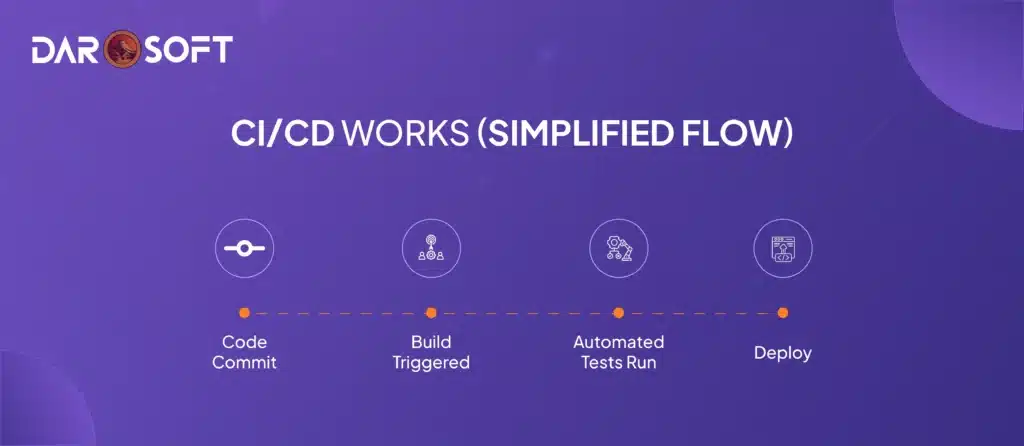
How CI/CD Works (Simplified Flow)
Code Commit: A developer pushes code to a Git repository
Build Triggered: CI tool builds the project (e.g., compiles, packages)
Automated Tests Run: Unit/integration tests check for bugs
Deploy: If tests pass, the CD tool deploys to staging or production
Why It Matters in DevOps
Reduces manual errors
Speeds up delivery cycles
Promotes a culture of continuous improvement
Keeps teams focused on building, not on fixing
Infrastructure as Code (IaC): Terraform, Ansible, Pulumi
“If you can write code, you can build the cloud.”
Imagine if setting up servers, networks, and databases was as easy as pushing code to GitHub, no more clicking through cloud dashboards, guessing what went wrong, or repeating the same setup 10 times.
That’s the magic of Infrastructure as Code.
What is IaC, and Why It Matters?
IaC lets you define your infrastructure using code, so you can:
Build cloud environments with a single command
Reuse configurations across teams and projects
Version control your entire infrastructure: like code
Forget “it works on my machine.” With IaC, it works everywhere: the same way.
Top IaC Tools & What They Shine At
Tool | What It Does Best |
Terraform | “The architect” – Provisions cloud resources across providers (AWS, Azure, GCP) using code. Great for infrastructure setup. |
Ansible | “The caretaker” – Automates server configuration, patches, and deployments. Agentless, simple, powerful. |
Pulumi | “The developer’s choice” – Write infrastructure in real programming languages (Python, TypeScript, Go): not just config files. |
Use Cases
You’re launching a new app.
With Terraform, you create a full cloud environment in seconds: load balancers, servers, and databases.
With Ansible, you configure those servers and deploy your app automatically.
With Pulumi, you do it all: in the same language your devs already use.
Result? A fully repeatable, testable, and destroyable environment, all managed through Git.
Why DevOps Teams Love IaC
No more manual setups
Perfect for CI/CD automation
Scales with your infrastructure needs
Makes security & compliance auditable and codified
“If your infrastructure isn’t in code, it isn’t really in your control.”
Containerisation: Docker
“If it works on your laptop, it should work anywhere.” : Docker makes that true.
What is Containerisation?
Containerisation is a way to package your application and everything it needs (code, libraries, system tools, runtime) into a single, lightweight unit: called a container.
Think of it like putting your app in a sealed shipping container:
All its dependencies travel with it
It runs the same everywhere, on a developer’s laptop, in testing, or the cloud
It’s isolated from other apps, so no conflicts
Docker: The Industry Standard for Containers
Docker is the most popular tool for creating, running, and managing containers. It’s:
Fast and lightweight
Cross-platform
Easy to integrate into DevOps pipelines
Best At
Packaging apps with everything they need to run
Isolating environments: no “it works on my machine” issues
Scaling microservices architectures efficiently
Speeding up development with consistent local/test/prod setups
Why DevOps Loves Docker
Developers can build once, run anywhere
Works seamlessly with CI/CD tools and Kubernetes
Enables rapid testing and quick rollbacks
Reduces infrastructure complexity and OS dependency issues
Example Use Case
You’re building a Node.js web app.
Instead of installing Node, npm, and every package manually on every server…
You create a Docker image with your app and everything it needs
You deploy the image anywhere: AWS, Azure, Digital Ocean, even on a colleague’s laptop
It just works.
Container Orchestration: Kubernetes
Container orchestration is about automating the deployment, scaling, and management of large numbers of containers.
Think of it like running a busy airport:
Containers = airplanes
Kubernetes = the air traffic control that ensures everything takes off, lands, and operates smoothly: even during traffic spikes.
What is Kubernetes (a.k.a. K8s)?
Kubernetes is an open-source system originally developed by Google. It helps DevOps teams:
Run containers in clusters across multiple machines
Keep apps running, even if some parts fail
Scale automatically based on demand
Roll out updates with zero downtime
Best At
Managing container clusters at scale
Auto-scaling apps up/down based on load
Self-healing: restarts failed containers automatically
Rolling deployments: updates without user impact
Isolation & resource control per container or app
Why DevOps Teams Use Kubernetes
Perfect for microservices architectures
Integrates with Docker, Helm, and cloud providers (GKE, EKS, AKS)
Enables infrastructure-as-code at the cluster level
Reduces manual operations and risk
Real-World Use Case
You have a web app made of multiple services (frontend, backend, database).
Kubernetes ensures all services run across a cluster of machines
If traffic spikes, it spins up more containers
If one fails, it is replaced instantly
All while keeping your app online and responsive

Monitoring & Observability
What’s the Difference?
Monitoring is about collecting and analyzing data, like CPU, memory, errors, and response times.
Observability goes deeper: it helps you understand why something is wrong, not just that it is.
Together, they help you detect, diagnose, and resolve issues fast.
Best At
Tracking system performance (uptime, load, latency)
Sending alerts when something goes wrong
Creating real-time dashboards for visibility across teams
Root cause analysis when incidents happen
Measuring deployment impacts after a release
Popular Tools
Tool | What It Does |
Prometheus | Open-source monitoring & alerting toolkit. Great for time-series data. Often used with Kubernetes. |
Grafana | Visualization platform. Connects to Prometheus and many others to create custom dashboards. |
Datadog | Full-stack observability platform: metrics, logs, traces, and real-time alerts. Easy setup, cloud-native. |
Why DevOps Teams Rely on Monitoring
Catch issues before users do
Measure system health during and after deployments
Support SLOs, SLAs, and uptime guarantees
Reduce MTTR (mean time to resolution) during incidents
Example Scenario
You deploy a new update.
Prometheus tracks CPU usage and error rates.
Grafana shows a spike in load on a dashboard.
Datadog sends an alert to Slack: before customers even notice.
“In DevOps, visibility isn’t optional: it’s your first line of defense.”
Security & Compliance: Aqua, Snyk, Trivy
As DevOps accelerates releases, security needs to move earlier in the pipeline: baked into every stage of development, not slapped on at the end.
This is where DevSecOps comes in:
It’s the practice of automating security checks across your code, containers, and cloud infrastructure without slowing down development.
Best At
Scanning code and dependencies for known vulnerabilities
Scanning containers and Docker images for misconfigurations and exploits
Monitoring open-source packages for license compliance and security risks
Integrating with CI/CD tools to catch issues before deployment
Popular Security Tools
Tool | What It Does |
Snyk | Scans your code, dependencies, containers, and IaC for known vulnerabilities. Developer-friendly with Git and CI integration. |
Trivy | Lightweight, open-source vulnerability scanner. Great for scanning container images, file systems, and repositories. |
Aqua Security | Enterprise-grade container security platform. Includes runtime protection, policy enforcement, and image scanning. |
Why DevOps Teams Need Security Automation
Prevent breaches before code hits production
Ensure compliance with regulations and internal policies
Save time by catching risks early (when they’re cheapest to fix)
Build trust with users, customers, and stakeholders
Example Workflow:
Developer pushes code → CI/CD pipeline triggers
Trivy scans the Docker image
Snyk checks the app’s dependencies
Aqua enforces runtime policies in production
If any high-risk vulnerability is found, the build fails automatically
Secrets Management: Vault by HashiCorp, AWS Secrets Manager
“Hardcoding passwords in code? That’s how breaches begin.”
In DevOps, automation is everywhere, but with that comes a big challenge: How do you keep your credentials, tokens, API keys, and secrets safe in an automated world?
What is Secrets Management?
Secrets Management is the practice of securely storing, accessing, and controlling sensitive information such as:
Database passwords
SSH keys
Cloud access credentials
Encryption keys
Rather than writing secrets into your code, configs, or Dockerfiles (which is risky), you use a secure centralized vault.
Best At
Securely storing secrets outside of code
Fine-grained access control: only the right service/user can access the right secret
Auditing & logging who accessed what, and when
Automatic secret rotation for better security hygiene
Integrating secrets into apps & pipelines at runtime
Popular Tools
Tool | What It Does |
Vault by HashiCorp | Powerful, open-source secrets management platform. Supports dynamic secrets, encryption as a service, and policy-based access. |
AWS Secrets Manager | Fully managed service for storing and rotating secrets securely. Seamlessly integrates with other AWS services. |
Why DevOps Needs Secrets Management
Prevents credential leaks in version control (like GitHub)
Helps meet compliance standards (GDPR, SOC 2, HIPAA, etc.)
Makes secrets automatable and revocable
Supports zero-trust architecture practices
Example Scenario
Your app needs to connect to a database.
Instead of hardcoding the DB password, it pulls it securely from Vault or Secrets Manager at runtime
The secret is encrypted at rest and in transit
Access is logged and tightly controlled
The password can be rotated automatically every 30 days

Log Management: ELK Stack (Elasticsearch, Logstash, Kibana), Loki
In a complex DevOps environment with multiple services, containers, and cloud systems, logs get scattered across servers. Without a strategy to collect and analyze them, you’re flying blind.
That’s where log management comes in. It centralizes logs from everywhere, making them easy to search, visualize, and alert on in real time.
Best At
Centralized collection of logs from multiple apps and systems
Searching and filtering logs for debugging and incident response
Visualizing patterns and trends across time or services
Triggering alerts based on log patterns or error spikes
Popular Log Management Tools
Tool | What It Does |
Elasticsearch | Fast, scalable search engine that stores and indexes logs. |
Logstash | Data processing pipeline: collects, transforms, and ships logs. |
Kibana | A visualization dashboard that makes your logs readable and beautiful. |
Loki | Lightweight, log aggregation system from Grafana Labs. Designed for use with Grafana dashboards. Optimized for Kubernetes. |
Together, ELK Stack gives you powerful, enterprise-grade log analytics.
Loki offers a simpler, cost-effective solution, especially great if you’re already using Grafana.
How Log Management Fits into DevOps
Apps and services generate logs (e.g., errors, requests, events)
Logstash or Promtail collects them
Elasticsearch or Loki stores and indexes them
Kibana or Grafana visualizes them in dashboards
Teams investigate issues, spot trends, or get notified when something breaks
Why DevOps Teams Use It:
Speeds up incident response and root cause analysis
Helps spot issues before users report them
Tracks app health, user behavior, and system performance
Meets compliance requirements (auditable logs)
“Logs tell the truth: but only if you can find and read them.”
Configuration Management: Chef, Puppet, SaltStack
In large environments, manual server setup is slow, error-prone, and nearly impossible to maintain consistently.
Configuration Management (CM) tools solve this by letting you automate how systems are set up, configured, and maintained: at scale.
Best At
Automating system configurations (e.g., install packages, set file permissions, start services)
Enforcing consistency across development, staging, and production
Testing and versioning system setup, just like application code
Improving compliance by tracking all changes and keeping systems aligned
Popular Configuration Management Tools
Tool | What It Does |
Chef | Uses Ruby-based DSL to define system configurations as “recipes.” Ideal for complex environments with detailed logic. |
Puppet | Declarative language focused on describing the desired system state. Strong for infrastructure compliance and reporting. |
SaltStack | Event-driven automation and remote execution at scale. Fast, Python-based, great for high-speed deployments and real-time responses. |
Why DevOps Teams Use Configuration Management
Reduces manual setup time from hours to minutes
Prevents drift (when servers become inconsistent over time)
Enables infrastructure as code (IaC) for servers
Makes onboarding new environments repeatable and predictable
Use Cases
You want all web servers to:
Have Nginx installed
Keep port 80 open
Use the same security config
With Puppet or Chef:
You define the desired state in code
Apply it to 10, 100, or 1000 servers
The tool ensures all systems match, and re-applies changes if something drifts
Collaboration & Agile Planning
DevOps isn’t just about automation and tools: it’s about people working together. To build and ship faster, teams need structure, clarity, and transparency in their workflows. That’s where agile planning and collaboration tools come in.
These platforms help teams track work, plan sprints, and stay aligned, from developers to designers to stakeholders.
Best At
Managing tasks, user stories, and backlogs
Planning and tracking sprints or Kanban workflows
Facilitating cross-team collaboration
Visualizing project progress with boards and reports
Sending alerts and status updates to keep everyone informed
Popular Agile Planning Tools
Tool | What It Does |
Jira (by Atlassian) | Powerful issue tracking and agile project management platform. Ideal for scrum teams, supports epics, stories, sprints, and custom workflows. |
Azure DevOps Boards | Integrated with Microsoft’s DevOps suite. Great for tracking tasks across CI/CD and code repos. Tight GitHub and Azure Pipelines integration. |
Trello | Simple, card-based Kanban board. Ideal for visual planning, team checklists, and lightweight project tracking. Perfect for beginners or non-technical teams. |
How It Works in a DevOps Workflow
The product owner creates user stories and tasks
Team plans a sprint: tasks go into a board (e.g., Jira or Trello)
Developers pick up tasks → write code → link commits to stories
QA and release teams track progress in real time
Reports & burndown charts show what’s done, what’s blocked
Why DevOps Needs Agile Planning
Keeps everyone on the same page, even across time zones
Breaks work into clear, actionable pieces
Enables continuous delivery by aligning dev and ops priorities
Helps teams respond quickly to change with real-time updates
DevOps Tools Overview Table
Category | Popular Tools | Best At |
Version Control | Git, GitHub, GitLab, Bitbucket | Collaborative coding, version tracking, and branching workflows |
CI/CD Pipelines | Jenkins, GitHub Actions, GitLab CI/CD, CircleCI | Automating build, test, and deploy processes |
Infrastructure as Code | Terraform, Ansible, Pulumi | Provisioning reproducible and scalable infrastructure |
Containerization | Docker | Packaging and isolating applications with all dependencies |
Container Orchestration | Kubernetes | Managing and scaling containerized applications across clusters |
Monitoring & Observability | Prometheus, Grafana, Datadog | Tracking system performance, visual dashboards, and real-time alerts |
Security & Compliance | Snyk, Trivy, Aqua | Scanning code and containers for vulnerabilities and compliance |
Secrets Management | Vault, AWS Secrets Manager | Secure storage and rotation of credentials and sensitive configuration |
Log Management | ELK Stack (Elasticsearch, Logstash, Kibana), Loki | Centralized logging and real-time log analysis |
Configuration Management | Chef, Puppet, SaltStack | Enforcing system configuration consistency across servers |
Collaboration & Planning | Jira, Trello, Azure Boards | Managing sprints, backlogs, and team workflows |
DevOps Platforms | Azure DevOps, GitLab, Harness, Octopus Deploy | Full-lifecycle integration and orchestration across the DevOps toolchain |
Conclusion
With so many DevOps tools out there, it’s easy to get caught chasing hype. But success doesn’t come from picking what’s popular; it comes from picking what’s practical.
Key Takeaways
Start with your team’s workflow: choose tools that integrate well with your processes.
Consider your team’s skills: pick tools your team can learn, support, and extend.
Think long-term: favour maintainable, scalable tools over complex setups.
Focus on integration: tools that play well together save time and reduce friction.
Grow gradually: you don’t need the whole stack on day one.



